June 26, 2026
F1Guessr, GeoGuessr for race photos, and the computer vision technology that built it
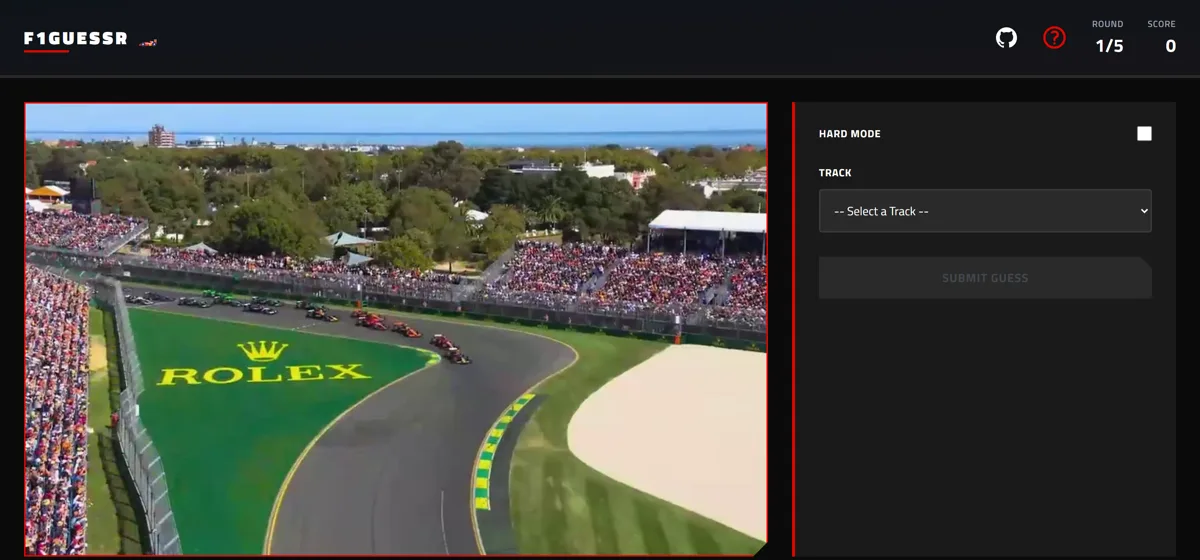
Happy F1 weekend! My webgame F1Guessr is a Geoguessr-inspired game for Formula 1 fans, where you guess the track and year from an image of a Grand Prix. And it utilizes a LOT more computer vision technology underneath than you might think.
Where it started
When I began building F1Guessr last November, I painstakingly manually reviewed every one of a thousand images, filtering out ones that were too blurry, accidentally caught a UI transition, or that I felt didn’t show the track or cars well enough. It took me only a couple of hours, but by the end of it, I could tell the difference between the shade of blue used for the trackside paint at Miami International Autodrome and the one at Yas Marina. Vibrant green grass trackside? Albert Park. Thin stripes of red, white, and green? Imola, of course!
As I continued to build up more skills and understanding of computer vision, I decided to revisit the project this past spring. To make dataset generation much faster, I added a few filtering methods into my image capture pipeline:
- Added a Gaussian blur detector to quickly filter out images that were way too blurry
- Added YOLO-World detection on the word “car” and filtered down to only use images with multiple cars in them, as well as filtering out images where a “person” took up a large proportion of the screen
- Added CLIP zero-shot classification based on two sets of text prompts describing my ideal image
But I wondered if I could go even further: Could a trained model beat my game? (And beat my accumulated knowledge?!)
Quick bit of training
I had all the data I needed to train a multi-head classifier for guessing the track and year, so I ran my image collection script a few more times to collect more sample images, then trained an EfficientNetV2-S over 50 epochs. At the end of training, I ended up with an accuracy around 95% and a couple funny bugs (needed to remember to classify by track, not grand prix, as the 2020 season featured multiple GPs held at the same track!).
The model was then exported to ONNX Web and popped straight into my local dev environment on the webpage, and I watched in delight as it immediately identified that tan gravel pit that I know well as belonging to the Red Bull Ring.
Thinking like a computer
In my initial “helpful tips” that I published in the F1Guessr tooltip, I mentioned a few heuristics that I had found were good for detecting what track and year it was. So, I was left with the question: did my trained model think similarly?
I used the interpretability method, Grad-CAM, to generate heatmaps illustrating for a random sample of images, what features supported the correct answer for both track and year. Perhaps unsurprisingly, it quickly found that the UI elements, particularly the timing tower UI, were an excellent indicator of which year it was, as I had hinted at.
For the track head, it focused a lot on the track edges, which also made a lot of sense to me: grass patches, fencing or barriers, and certain track paint thicknesses, colors, or patterns can quickly give away the track.
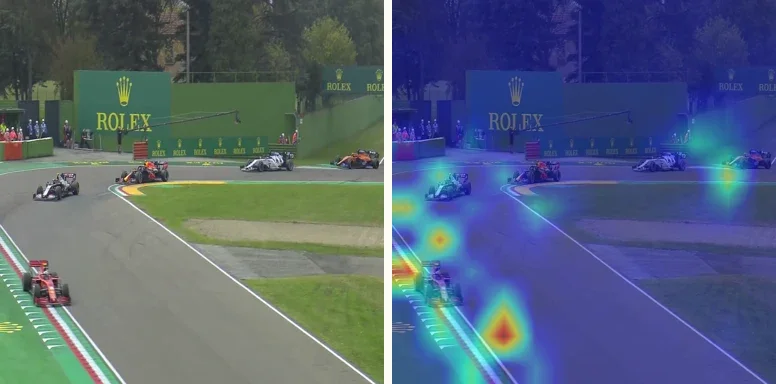 Track-head Grad-CAM on an Imola frame
ML-driven decisions
Given how powerful the UI elements were in predicting the year of the image, I decided to modify the game to add a “hard mode” to predict the year and make the base of the game just detect the track. This meant cropping out the timing tower and shaving a bit more off the other sides as well. I also decided that, rather than grabbing a random sample from my captured screenshots, to use the classifier’s predictions to determine which images to include in the game. That is: take the classified dataset and grab the top 500 images by how confidently the model predicted the correct class, to use in the game.
As well, a fun tip I had learned from fast.ai’s course on image classification, I grabbed the images with the lowest confidence in prediction and reviewed those, and found that there were still tweaks I needed to make to my CLIP prompts to get rid of UI elements.
By the end of this process, I had a new set of Grad-CAM heatmaps that showed that the year was now being predicted primarily based on the cars themselves: how their livery and shape changed from year to year.
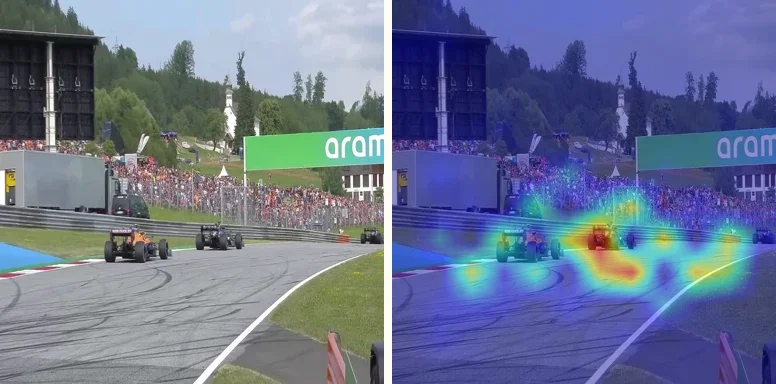 Year-head Grad-CAM on a 2021 Red Bull Ring frame
Check it out yourself!
Give F1Guessr a try (it’s harder than my model makes it look)!
As well, you can see my Grad-CAM analysis site, illustrating which features the trained model honed in on for each track and year at f1guessr.com/how-it-works.